←
Back to Blog
Cybersecurity
•
•
Team PixelPilot
•
3 min read
Content Security Policy Essentials
Set CSP response headers, refine policy rules by asset and origin, and validate across Chrome, Firefox, and Safari to st
Introduction
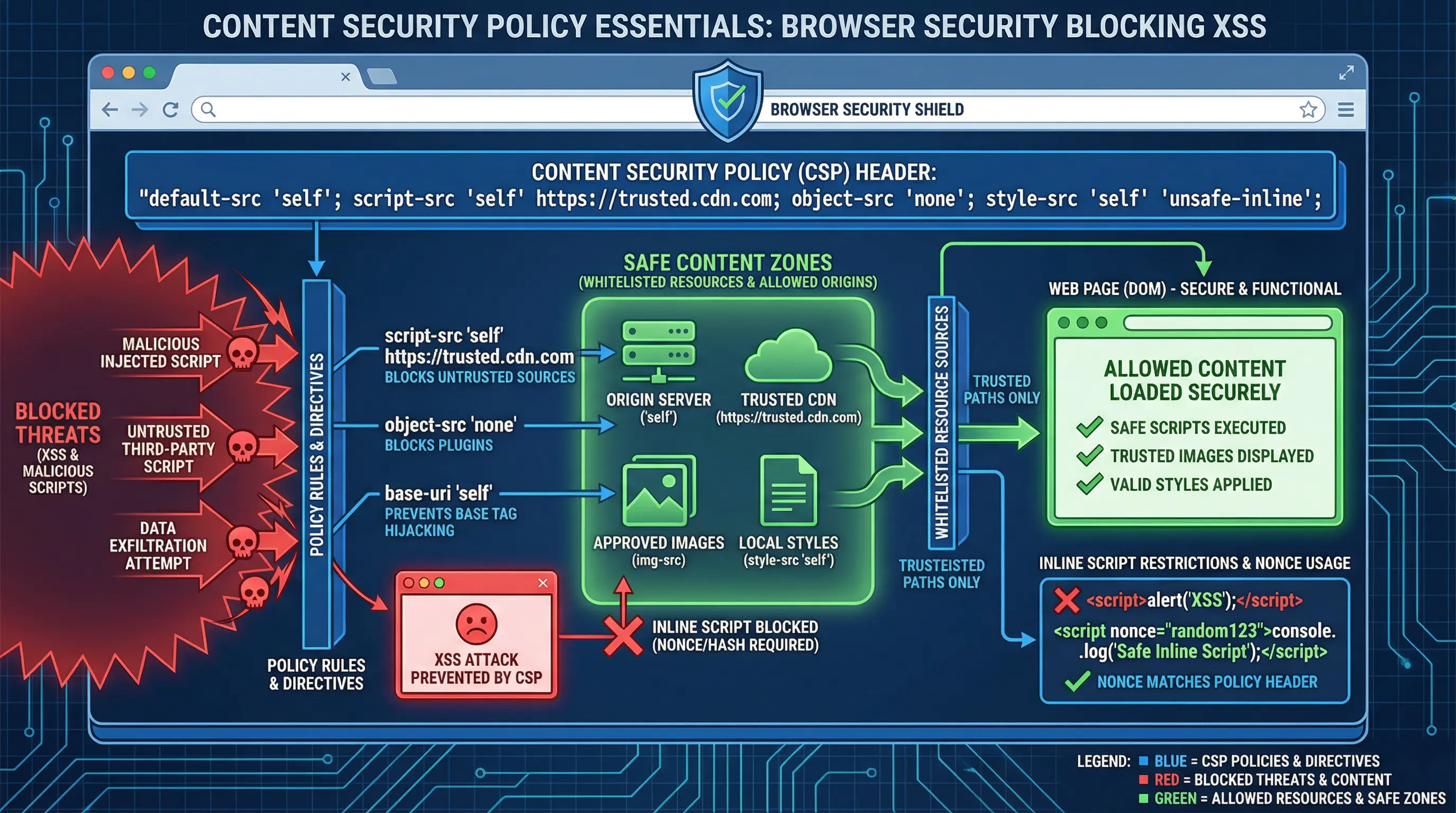
Web security threats continue to evolve in 2026, and Content Security Policy (CSP) has become a critical layer of defense for modern web applications. CSP is a browser-based security mechanism that helps prevent attacks like cross-site scripting (XSS), data injection, and malicious content execution.
By implementing CSP, organizations can protect users, maintain trust, and reduce the risk of data breaches, while also supporting secure deployment of third-party scripts and resources.
Understanding Content Security Policy
What is CSP
A HTTP header that specifies which sources of content are trusted by the browser
Controls loading of scripts, styles, images, fonts, frames, and other resources
Helps mitigate risks associated with untrusted content, user-generated input, or third-party libraries
Key CSP Concepts
Directives – Rules that define which content is allowed or blocked (e.g., script-src, img-src)
Sources – Trusted origins, including domains, data URIs, and self-hosted resources
Policies – Combination of directives and sources that define the overall security posture
Core CSP Directives
1. default-src
Acts as a fallback for any resource type not explicitly defined
Example: default-src 'self'; allows content only from the same origin
2. script-src
Controls JavaScript sources
Restrict execution to trusted scripts, avoid inline scripts where possible
Example: script-src 'self' https://cdn.example.com;
3. style-src
Controls CSS sources
Avoid unsafe inline styles ('unsafe-inline') when possible
Example: style-src 'self' https://fonts.googleapis.com;
4. img-src
Restricts image sources
Example: img-src 'self' https://images.example.com;
5. connect-src
Controls AJAX, WebSocket, and fetch endpoints
Example: connect-src 'self' https://api.example.com;
6. frame-src / child-src
Controls iframes and embedded content
Prevents malicious content injection from untrusted sites
7. report-uri / report-to
Specifies where violation reports should be sent
Allows monitoring of CSP enforcement without breaking functionality
Implementing CSP Effectively
Step 1: Audit Existing Content
Inventory all scripts, styles, images, fonts, and external resources
Identify third-party services that need to be whitelisted
Step 2: Define a Baseline Policy
Start with a report-only mode to detect violations without blocking content
Example:
Content-Security-Policy-Report-Only: default-src 'self'; script-src 'self' https://cdn.example.com; report-uri /csp-report-endpoint
Step 3: Enforce Strict Policies
Gradually move from report-only to enforce mode
Minimize 'unsafe-inline' and 'unsafe-eval' usage
Whitelist only trusted domains
Step 4: Monitor and Iterate
Review CSP reports to identify blocked or suspicious content
Update policy as the application evolves, including third-party integrations
Balance security and usability to prevent breaking legitimate functionality
Best Practices
Use Nonce or Hash for Inline Scripts – Allows safe inline execution without 'unsafe-inline'
Whitelist Minimal Domains – Only include trusted domains and avoid wildcards (*)
Report Violations – Continuous monitoring helps identify vulnerabilities or policy gaps
Integrate CSP in CI/CD – Automate testing of CSP rules during deployment
Combine with Other Security Headers – Use alongside X-Frame-Options, Strict-Transport-Security, and X-Content-Type-Options
Business Benefits
Reduces risk of XSS attacks and malicious script injection
Protects sensitive user data and builds trust
Supports compliance with industry regulations and security standards
Improves visibility into potential threats through CSP reporting
Challenges and Considerations
Third-party scripts may require frequent updates to the policy
Inline scripts and dynamic content can complicate enforcement
Browser compatibility varies; older browsers may ignore certain directives
Balancing security and functionality requires careful testing
Conclusion
Content Security Policy is an essential tool for web security in 2026. By defining and enforcing trusted sources for scripts, styles, and other resources, CSP helps prevent a wide range of attacks while improving user trust and regulatory compliance.
A proactive approach—including audit, report-only testing, strict enforcement, and continuous monitoring—ensures that websites and applications remain secure without sacrificing usability. Implementing CSP effectively is a strategic investment in long-term security and resilience.
Need help with your digital project?
Our team builds websites, mobile apps, e-commerce platforms and runs data-driven marketing campaigns for businesses across the UK.